 Liftgeist · blog
Build log
Training that keeps the receipts
I built a free workout and macro tracker in six weeks because three apps could not answer one question. Here is how it works, what it runs on, and everything that broke.
Why I built it
A lifting app, a macro tracker and a weigh-in app cannot tell you whether the extra food moved the lifts. Each one keeps its own history, in its own format, behind its own subscription, and the one question I actually wanted answered falls into the gap between them. Did the heavy week and the hungry week happen together? Did bodyweight go up because the bench did, or instead of it?
So I wrote a tracker that keeps all three in one ledger. Every set you log, every meal you photograph and every morning weigh-in lands in the same history, keyed by the same dates, charted against each other, and exportable as a file you own.
It did not start as a product. The first commit, on 28 June 2026, is a single 3,130-line index.html called Lift Log: a vanilla single-file web app with Supabase sync bolted on, built for me and a friend. His six-month spreadsheet program is still hard-coded into the legacy file as an onboarding template, under a comment labelled Gio beta. The local storage key still carries the name of the original goal, which was abs by August. Make of that what you will.
The React and Vite rewrite started the next day, with a build-time check that fails the deploy if the storage key, the cache rules or a single line of the data migration drift from the original file, because real people already had data in it. Capacitor came the same day. The name went from Lift Log to RepLedger to Liftgeist inside ten days. Six weeks and 288 commits later it is a web app, an iOS app, an Android app, an Apple Watch rest timer, a web dashboard and a 448-program catalog with an AI coach in front of it.
The tracker's job is not to motivate you. It is to never lose a set, never lie about a number, and never change your plan without telling you.
What it looks like
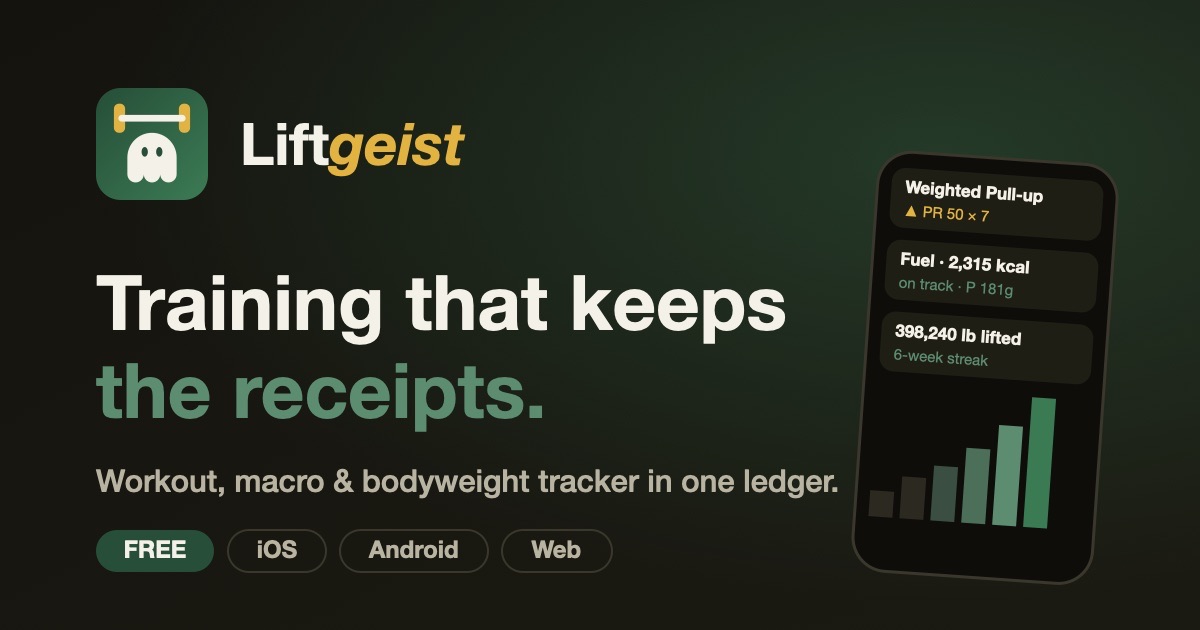
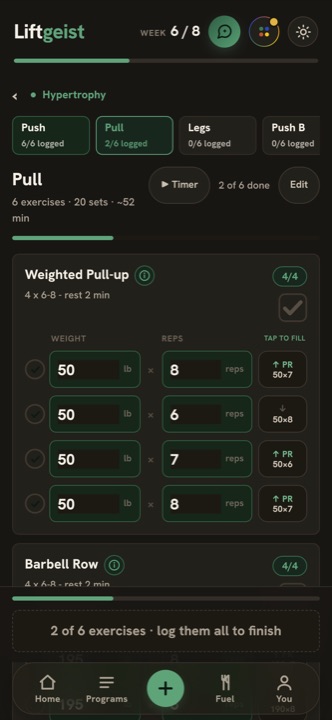
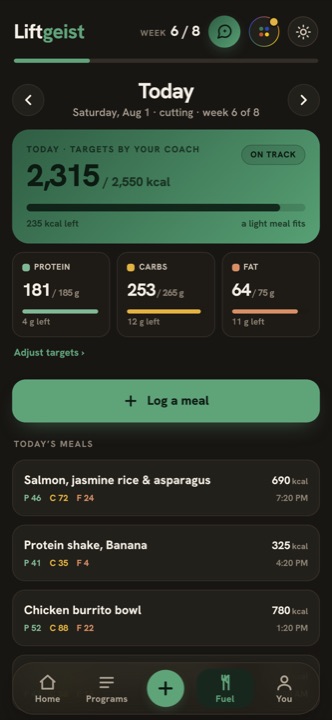
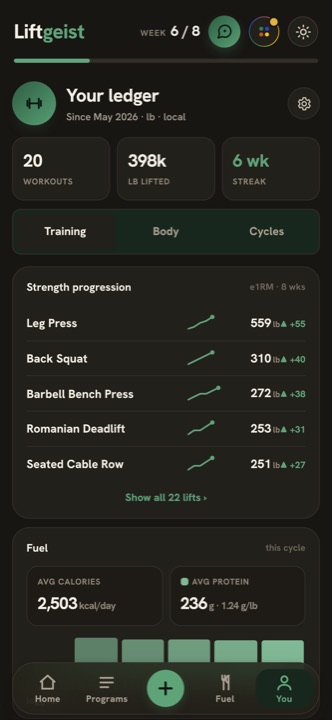
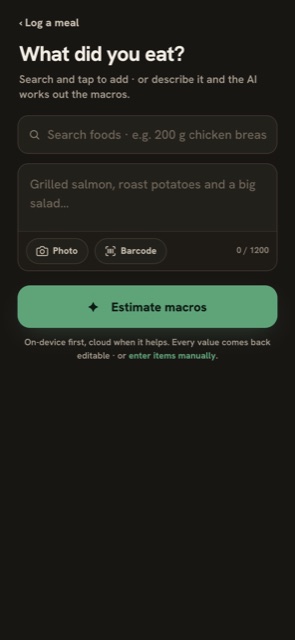
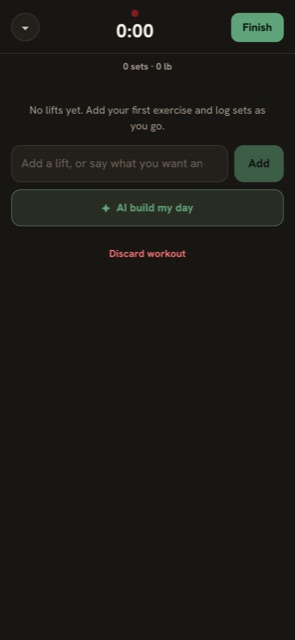
These are real screens from app.liftgeist.com. The first three are the product screenshots from the landing page, a ledger with several weeks of history; the rest were captured in guest mode on a phone-sized viewport.
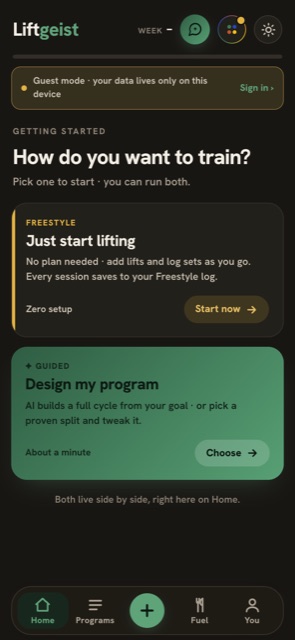
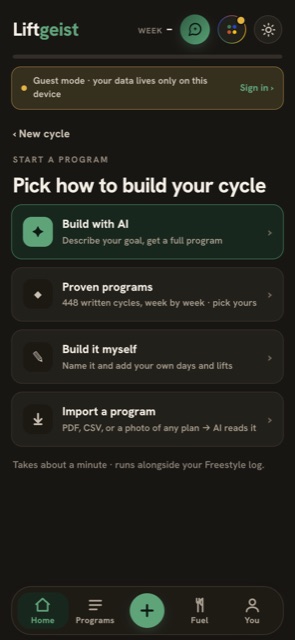
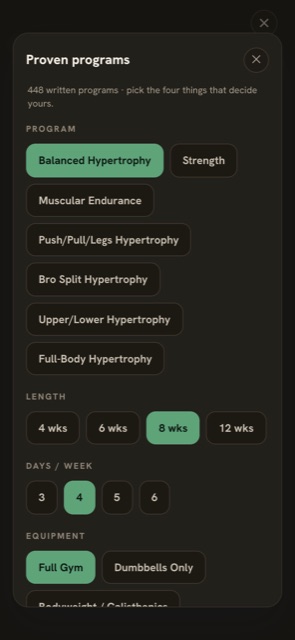
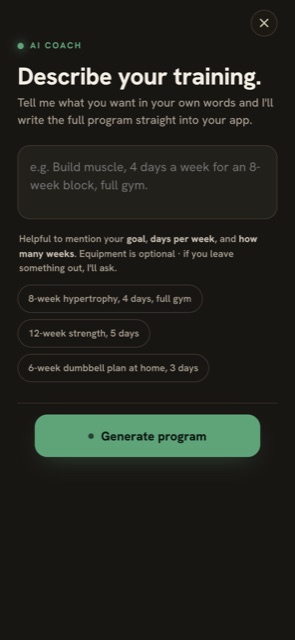
How workout generation works
There are three ways a program gets into Liftgeist: pick one from a written catalog, describe what you want and let Claude design it, or upload someone else's plan. All three produce the same shape and flow through the same pipeline, so a program built by the AI and a program pasted from a PDF are indistinguishable once they are a cycle.
The catalog: 448 written cycles
Nobody typed 448 spreadsheets. The catalog is compiled from a compact, normalized library of training building blocks, with citations behind the numbers, and a set of rules for assembling them into weeks and progressing them across a block. Pick a style of training, a length, a weekly frequency and your equipment, and the app resolves the matching cycle on the spot.
Fully expanded, the 448 programs run to many megabytes. The app does not ship that. A build step extracts only the parts that are authored rather than derivable, then does the thing that lets me sleep: it resolves every program through the same code the app uses and deep-compares the result against the fully expanded reference. A mismatch fails the build. "Smaller" can never quietly become "different".
Every week also knows where it sits in the block. A deload renders lighter than the weeks around it, an overload week sits closer to failure, and the schedule logic is smart enough that a three-day push/pull/legs block is not the same three days forever.
The AI builder: the note is the spec
You write one note. "Build muscle, 4 days a week for an 8-week block, full gym, and bring up my bench." That note goes to a server-side function, so the API key never touches the phone, and runs through two stages of Claude.
Stage one reads the note against a strict schema and returns what it could infer: goal, days, weeks, equipment, plus a coaching guess for anything missing. The picker screen only appears for the fields the note did not cover, pre-filled with those guesses, so it is usually one tap.
Stage two writes the cycle. The system prompt is long, and the part that took the most iteration is the part that stops the model from being helpful in the wrong direction. The generator treats the note as a specification, not a suggestion. If you name a split, you get that split, even when the day count divides awkwardly; push/pull/legs on five days means two of the sessions come twice, and the program says which. A priority lift leads a day and gets extra volume. An injury swaps out the hostile patterns, and the progression line says why. Equipment limits, schedule quirks, sports and dislikes all have to be visible in the exercise selection, the ordering and the session names. The week repeats, because that is what a cycle is. And a generic template that satisfies the structure but ignores the note counts as a failed response, not a program. What comes back is parsed and checked before it is allowed to become a cycle.
A few details that matter more than they look:
- Exercise names come from a pool, not from the model's imagination. The pool is built from a public-domain exercise database (873 movements), filtered by your equipment, and names have to come back exactly as given, because the form-guide demos are matched by name and a paraphrased name silently loses its demo.
- Less thinking, faster programs. Thinking tokens and output tokens share one budget, and an early version let the model think at length before writing. In one memorable failure it spent most of the budget thinking and then truncated the program mid-array. The prompt is prescriptive enough to hold the split without it, and turning it off took generation from nearly two minutes to about twenty seconds.
- Web search only for named published programs. If you ask for 5/3/1 or GZCLP the model can look it up. For an ordinary split it does not, because that was the other half of the latency.
- Every AI call has an offline fallback, and the fallback is labelled. If the server is unreachable, an on-device generator builds a sensible program from the basics. It never reads your note, so the result is tagged BUILT OFFLINE with a warning and a retry button. An unlabelled fallback reads as the AI ignoring you, which is worse than the AI being down.
The readiness check-in: never silent, deload protected
Before a catalog session, a slim row asks whether you are feeling off. Four questions, sleep, soreness, stress and energy, scored and weighted rather than simply averaged. The answer lands in one of three outcomes: run the day as written, trim the edges, or cut it back. Sharp or joint pain short-circuits everything and routes to substitute-or-stop, with no "run it anyway" button on purpose.
The questions, the weights, the rules and the exact sentences the app says are data, not code; the code is arithmetic and a rule matcher, and the data can be tuned without touching it. Two guardrails are enforced in code rather than trusted to the data: a planned deload is never cut further, whatever the score says, and the movements the session exists for keep their sets no matter what, because dropping the main work and keeping the arm work inverts the whole point.
The adjustment is applied over the written day and stored as a fact about that date. The program itself is never modified, which is why the strip on the Train screen reads "trimmed for today · your program is unchanged".
Week pinning: the plan can never contradict history
The moment you finish a session, that week is frozen into its own copy, with your logged sets still linked to it. Exercise edits land on the week you are looking at, and changes to the shape of a day apply forward, never to a week that is already in the books; that killed an old bug where editing week 7 also rewrote week 6. Sessions keep a stable identity across weeks, so "Push A" in week 5 knows it is the same session as "Push A" in week 1, and "what did I lift last time" is a lookup, never a guess.
The coach, and importing someone else's program
The in-app coach is the same model with a compact snapshot of your actual data: program and goal, bodyweight trend, today's sets so far, this week's and next week's plan with the phase line, all-time PRs with estimated 1RMs, nutrition versus targets, and your recent check-ins. It is told to quote the specific number and to say plainly when the data is absent. It can act, through four tools (log bodyweight, log a meal, log sets, adjust one exercise on today's day), but the server never executes anything. The app validates the call, shows a confirm card, validates again when you accept, and if you decline, the model is told so in no uncertain terms. It then confirms in the unit the app actually recorded, 166.9 lb rather than the 75.7 kg you said.
Importing works the same way in reverse: a handful of screenshots, a PDF or a CSV of any plan go to the model with one instruction, use the exercise names exactly as written and never swap in your own picks. The output is the same shape the builder produces, so it becomes a cycle through the same code path.
Macro and calorie tracking
The food side is called Fuel, and it lives in the same ledger as the training, not in a second database. That one decision is most of the product: meals, sets and weigh-ins share the same dates, a single sync path, the same delete-protection and the same export.
Type it, photograph it, scan it
Logging a meal is one full-screen sheet. You can search (your own history first, then about 5,000 USDA foods, then branded products from Open Food Facts), describe the meal in a sentence (or dictate one with your keyboard), attach a photo, scan a barcode, or any combination. "Estimate macros" sends the note and the photo to Claude and gets back a strictly shaped answer: a meal slot plus items, each with a human-readable portion and whole-number calories, protein, carbs and fat.
The model is held to the arithmetic, so the calories have to agree with the macros; it assumes normal adult cooked portions; and when both a note and a photo arrive, the note decides what and the photo decides how much. Nothing saves without passing through a review screen where every number is editable, and the AI items carry an "AI estimate" pill with the line "close enough to track trends, not lab-exact". If the network is down you drop into manual entry; the sheet never blocks.
Two small mechanics do a lot of work. Rescaling is grams-first: every portion that starts with a number gets an amount control, and the macros recompute from a stashed base rather than the last rounded values, so typing digit by digit never accumulates drift. And corrections are memory: if you hand-edit the chicken breast, the next estimate for "chicken breast" starts from your numbers, not the model's. Barcode scans bypass that memory on purpose, because a label is authoritative.
The barcode scanner runs in the browser, lazy-loaded so it stays out of the main bundle; the first hit goes to Open Food Facts, and the label's per-100 g values become a "125 g" portion you can rescale like anything else.
Targets: calories are computed, never typed
Targets are opt-in. With no goal set, Fuel is an intake-only ledger with no rings and no "remaining" math. When you do set a goal (cut, maintain, lean bulk), the sheet needs your bodyweight, and for a cut or bulk a goal weight on the correct side of it. It refuses to compute without a bodyweight, because a formula that does not know the person can only guess, and a guessed target is worse than none. There is a bug behind that rule: Number(null) is 0, and an early version clamped that into a 60 lb person with an 800 kcal target.
Maintenance is sized from bodyweight and how often you train, the deficit or surplus from a safe weekly rate toward the goal weight, protein and fat from bodyweight, and carbs fill the rest. The model writes a short note in the house voice; the server clamps whatever it says to a calorie floor that no goal is allowed to push below. If the network fails, a local version of the formula runs with fixed constants.
Whatever the source, the calories you see are never a typed number. The Calories field is read-only and equals p × 4 + c × 4 + f × 9; editing a macro moves the calories and the "about N weeks to X lb" line, and carbs are the balancing term. Calories and macros can therefore never disagree with each other.
One ledger
The entire account is one ledger. Training logs, freestyle sessions, bodyweight and waist check-ins, meals, per-food correction memory, deletion records and targets live together, saved on the device first and, when you sign in, synced to the cloud as one unit. That is why the You screen can put protein per pound of bodyweight next to this cycle's tonnage, and why the web dashboard can overlay a bodyweight line on the calorie bars with a single toggle. It is also why the calorie bars are coloured by macro composition: each bar is drawn as stacked calorie contributions at 4/4/9, so its colour split is its macro split, with a neutral remainder so the height still equals what you actually ate.
If you are coming from another tracker, the web dashboard imports your nutrition and bodyweight history from a MacroFactor export (and Cronometer, MyFitnessPal, Lose It, or any CSV). The importer is deliberately not a MacroFactor-shaped parser: it scores every column header against a synonym table, shows you the mapping to correct, refuses to let "Calcium" become calories, "Fat Percent" become dietary fat or "Serving Weight (g)" become bodyweight (the last two found on real exports), and resolves conflicts per meal slot with "fill the gaps" as the default, the only mode that cannot change a day you already recorded. MacroFactor's scale export is .xlsx, so there is a tiny zip-and-two-XML-parts reader for that rather than a 400 KB spreadsheet library.
How it compares
Every figure below was checked on 21 August 2026 against the vendor's own pricing or help pages, or, where a help center blocks automated reads (MyFitnessPal, Hevy, Cronometer), against search snippets of those same pages. US prices. They are all good apps; the point of the table is the shape of the gap, not a scorecard. Liftgeist wins on exactly one axis, lifts and food in one free ledger, and is honestly behind on others: no Google Play listing yet, and no social feed, friends or leaderboards if that is what you want out of a training app.
| Liftgeist | MacroFactor + Workouts | MyFitnessPal | Strong | Hevy | Cronometer | Liftosaur | |
|---|---|---|---|---|---|---|---|
| Price | Free, no ads. Pro is a one-time $29.99 unlock in the iPhone app, with a free 7-day trial | $11.99/mo each, or $89.99/yr for both | Free with ads; Premium $19.99/mo or $79.99/yr | Free; Pro $4.99/mo, $29.99/yr, $99.99 once (lower SKUs also listed) | Free; Pro $2.99 to $3.99/mo, $23.99/yr, $74.99 once | Free with ads; Gold $10.99/mo or $59.99/yr | Free, open source; $4.99/mo, $39.99/yr, $99.99 once |
| Free tier | All training and food logging, the AI builder and photo meals, no account needed (guest mode). Coach chat and extra themes are Pro, with a 7-day trial | None (7-day trial) | Diary and database; barcode, photo and voice logging are paid | Unlimited workouts, 3 routines | Unlimited workouts, 4 routines, 30-day or 3-month graphs | Diary, up to 95 nutrients, barcode scanner | Core app free |
| Lifts and food in one app | Yes, one ledger | Two apps, one account | Exercise diary | Workouts only | Workouts only | Calories burned only | Workouts only |
| Web app you can log in | Yes | No | Yes | No | Yes (planning and progress) | Yes | Yes |
| Apple Watch | Yes, on the App Store: log sets, run rests, see what is next | Nutrition yes, Workouts building one | Yes | Yes | Yes | Yes | Yes |
| Photo or AI meal logging | Free | Paid | Premium only | n/a | n/a | Gold only | n/a |
| Barcode scanning | Free | Paid | Premium since Oct 2022 | n/a | n/a | Free | n/a |
| Program generation | 448-cycle catalog, AI builder, coach, import from PDF or photo | Smart Generation (rule-based), paid | n/a | Templates only | Trainer, Pro | n/a | Scriptable programs, built-ins |
| Export | JSON backup and session CSV, free | Spreadsheets, in subscription | Premium only | CSV | CSV | CSV, free | Yes |
| Import from other apps | Nutrition and bodyweight from MacroFactor, Cronometer, MFP, Lose It or any CSV | None documented (Workouts: cannot import from other apps) | None documented | Cannot re-import its own CSV | Strong CSV only | None documented | Programs by link |
Sources: macrofactor.com, help.macrofactorapp.com, myfitnesspal.com and its support center, the US App Store listings for Strong, Hevy and Liftosaur, help.strongapp.io, help.hevyapp.com, cronometer.com, liftosaur.com. Every vendor sets regional prices.
Two things I want to be fair about. Hevy imports Strong's CSV and Liftgeist does not import workout history from anyone yet, only nutrition and bodyweight; that is next. And Cronometer's free tier is genuinely generous, including the barcode scanner. None of the apps in the table puts the lifts and the food in one history with one export, for free, in a browser, with no account. That is the whole bet.
The tech stack
One codebase, four surfaces. I tried to pick boring, cheap pieces and spend the complexity budget on the parts users feel: sync that never loses a set, updates that actually land, and a rest timer that buzzes on time.
One deployment
The marketing site and the app are one deployment, and the landing page is deliberately not the app's entry file. The reason is the kind of thing you only learn by almost doing it: the installed apps boot the same entry file the web serves, and every update bundle is a copy of the web build. Rename that file and every phone boots into a marketing page after its next update.
Sync: local first, then everywhere
Every state change is written on the device first, mirrored into native storage on iOS for reasons you will read below, and pushed to the cloud on a short debounce; anything structural flushes immediately. Pushes are serialized so two saves can never commit out of order, and every call has a timeout so a stalled request can never hang the app.
Cross-device freshness has two layers. After a successful push, the device sends a tiny "something changed" ping on a per-user channel, and the other devices re-pull. I used a ping rather than streaming the data itself because the ledger syncs as one unit, and shipping the whole thing to every listener on every save would be absurd. Then, because a websocket can die silently, a periodic heartbeat asks the server whether anything changed and pulls only when it did.
Self-hosted OTA
Every production build publishes an update bundle alongside the site, built reproducibly so that identical code never looks like a new update, and a build id surfaced in Settings tells you exactly which bundle a phone is running. Getting that reproducible was most of the work: the version was a hash of the zip, and the zip carried its entries in whatever order the filesystem handed them over, so the same commit hashed differently on a Mac than on the Linux box that builds the site. The mechanism is built and switched off. The App Store wants the binary it reviewed to be the binary that runs, which is a fair thing to want, so installed apps update through the App Store and the bundle machinery sits behind a single flag until there is a reason to turn it on.
The watch, and the one formula
The phone is the source of truth; the watch and the lock screen are mirrors driven by timestamps, never ticks, so a missed update cannot drift a clock. Every payload to the watch is the full session state with a monotonic sequence number; the watch drops anything stale, re-arms its alarm only when the deadline actually moved, and applies wrist commands (skip, plus or minus 15 seconds) locally first. An HKWorkoutSession keeps the watch app executing with the screen off, which is the free-tier way to get a sub-second haptic. The Live Activity puts the same timer on the lock screen and, on iOS 18, in the watch's Smart Stack.
And every strength number in the app comes from one function. Epley, nothing fancy, with a PR flagged when today's best estimate beats the prior best across every cycle by more than half a pound.
export function e1rm(weight, reps) {
  const W = parseFloat(weight);
  const R = parseFloat(reps);
  if (!Number.isFinite(W) || !Number.isFinite(R)) return null;
  return W * (1 + R / 30);
}
The web dashboard is built from the same codebase and imports the app's model directly, so volume, PRs and streaks have exactly one definition. It exists for the things a phone screen is bad at: months of calorie bars with a bodyweight line over them, a CSV import you are correcting column by column, a PR table you actually want to read. Same account, same ledger, and it sees what the phone wrote seconds after it was written.
Problems I ran into
Six weeks, 288 commits, and a lot of them are fixes. These are the ones I would want to have read before starting.
OTA updates silently disabled by missing CORS on static files
Self-hosted OTA shipped on 11 July. Pushes to production never showed up in the installed app. Nothing errored; the app just stayed old. The installed app runs on its own app-local origin, so its fetch of the update manifest is cross-origin. The API routes had CORS headers from a middleware function, but the update files are static assets with no function in front of them, so they came back with no CORS header at all. The webview blocked the manifest, the updater's catch block treated it as "offline, try next time", and it bailed on every launch. The fix is a dozen lines of header config, and the comment above them is the post-mortem. Your own static files are cross-origin from inside a webview, and a static folder gets none of the headers your functions add.
The await that hangs forever
After the CORS fix, OTA still "failed all the time", through a week of commits that each looked like they did nothing. Reproduced in the simulator: the function that loads the updater plugin returned the plugin object directly from an async function. A Capacitor registerPlugin() proxy turns every property access into a native call, including .then. When an async function returns a value, the runtime probes .then to see if it is thenable; that probe invoked a phantom native then(), which rejected, the rejection was swallowed, and the await never settled. No manifest check, no download, and no "app is ready" acknowledgement, which explains the second mystery: the one time a bundle did activate by hand, the plugin rolled it back ten seconds later for never being told the app was ready. The loader now returns a plain wrapper object, never the bare proxy, under a comment in capital letters.
The same commit fixed the quieter half: iOS keeps an app resident for weeks, so a launch-only check meant a daily user never updated. It now re-checks when you come back after a while away.
iOS evicted localStorage, and "localhost" turned the cloud off
An in-progress workout vanished from the installed app and people got randomly signed out, while the web version was fine. Xcode reinstalls and simulator deletes wipe WKWebView localStorage, and on real devices iOS can evict it under storage pressure; the sign-in session lived there too. Every local write now mirrors into native preferences, which iOS does not evict, and a boot-time restore puts back anything the webview lost before the app reads its state. The third finding in the same day was a classic: capacitor://localhost tripped the "localhost means local-only dev" heuristic, so the native app booted with auth and sync entirely off. That localhost is a production surface.
Typing a meal zoomed the whole app in, permanently
iOS auto-zooms into any focused text field under 16 px, and the meal textarea was 15 px. With no zoom lock in the viewport meta, the page stayed zoomed after the field lost focus, and in an app there is no pinch gesture anyone expects to use. maximum-scale=1.0, user-scalable=no in the viewport, and every input at 16 px as a backup. A sibling fix the same day removed autoFocus from the AI textareas, because popping the keyboard on open made iOS scroll-jump the whole webview, which users described as "using the AI option puts the app into scroll mode".
The watch buzzed five seconds late, then quit after four sets
Three causes at once. watchOS holds a watch-scheduled notification for up to about 13 seconds trying to dedupe it against a phone notification with a matching identifier; the watch and the phone used different identifiers, so they never matched and every buzz ate the timeout. Stale queued transferUserInfo replays kept re-arming and cancelling the buzz mid-workout. And the phone's own notification had no sound field, which on iOS means silent. The fix is a two-layer alert: an in-process timer on the watch that plays a double haptic at the deadline, kept alive by a workout session, and a backstop notification scheduled two seconds later under an identifier deliberately identical to the phone's, so the precise layer's cancel always wins the race. There is a line in the docs now: never rename one id without the other.
A "rest over" buzz in the middle of the next set
A non-repeating timer whose deadline elapses while the watch process is suspended does not skip it; it fires once, immediately, when the queue is next serviced. So in every state where the watch was not held awake, the buzz was late rather than absent, sometimes by a full set. Three separate bugs that day shared one invariant, now written down: an armed alert must have an owner that can invalidate it locally. The alarm keeps its own armed deadline and refuses to fire more than two seconds past it.
private func fire() {
    timer = nil
    let deadline = armedFor
    armedFor = nil
    let center = UNUserNotificationCenter.current()

    // Overdue by more than a moment means the deadline passed while this
    // process was suspended and the timer only ran now. The rest is long
    // over and the backstop notification already carried it; buzzing here
    // would land mid-set. Tolerance covers ordinary queue latency, not a
    // resume from suspension.
    guard let deadline = deadline, deadline.timeIntervalSinceNow > -2.0 else {
        // Deliberately does NOT cancel the backstop here. Layer 1 has just
        // declined this rest, so the notification is the only alert left
        // for it. In practice it already fired at deadline+2s while this
        // process was suspended, making a cancel a no-op; if it is somehow
        // still pending, letting it ring is the correct outcome.
        return
}The lock screen froze at REST 0:00
A rest that ended while the phone was locked left the Live Activity showing "REST 0:00" indefinitely. The widget already knew how to collapse an ended rest, but a SwiftUI widget body only re-evaluates when the activity receives an update, and a locked phone's suspended webview never sends one. The system-rendered countdown painted digits down to 0:00 on its own and stopped, with the rest panel fossilized around it. Every update was passing staleDate: nil. One argument fixes it: stale the content at the deadline plus one second, and ActivityKit re-renders by itself.
await activity.update(ActivityContent(state: state, staleDate: end.addingTimeInterval(1)))The rest chime that felt random
The in-app ding sometimes rang and sometimes did not, and never with the mute switch on. Earlier, the opposite problem: the timer paused Spotify and did not give it back. The underlying fact is that WKWebView's WebAudio rides an ambient-style audio session, muted by the hardware switch and parked in an odd "interrupted" state after a call or Siri, and there is no web API for "play in the background without interrupting other audio". The fix is a tiny native plugin that synthesizes the same four blips under AVAudioSession.playback with .mixWithOthers: audible on silent, mixes over music instead of pausing it. The ding call now resolves true only when a ding actually sounded, because a swallowed rejection used to mark the alert as fired.
"I deleted it and it came back"
First freestyle sessions, then cycles, then two phantom sessions that put a block at 34 finished workouts on the dashboard against 32 in the app. A cloud-wins pull had rescue logic whose only job was to save local work whose push had died; it could add things back and never remove anything. If the cloud still held a record because the delete-push failed or raced, the next pull resurrected it. The fix is the same family three times: deletions are synced data. Every delete leaves a tombstone, tombstones travel with the ledger and are honoured on every surface, and a tombstone on either side vetoes any rescue. The cloud copy alone no longer wins.
A cousin of this bug: "trained as guest for a week, signed in, week gone." Guest cycles are numbered from a fresh counter, so a guest cycle whose number collided with one the account already had looked "already known to the cloud" and was silently dropped by the rescue. Guest ids are now rebased on sign-in into a range no account counter can reach.
The AI "ignored" a push/pull/legs request. It never ran.
A request for PPL on 4 days came back as Upper A, Lower A, Upper B, Lower B. It looked like the model ignoring the note. The decisive cause was the parser: it sliced from the first { to the last } and handed that to JSON.parse. One stray brace in a sentence around the JSON made the slice unparseable, the server returned an error, and the client fell back to the on-device generator, which picks a split from the schedule alone; for four days that is exactly Upper A, Lower A, Upper B, Lower B. The only signal was a tag reading "YOUR PROGRAM" instead of "GENERATED FOR YOU". The parser now scans for balanced objects while tracking string state, the error carries a snippet of the raw text, and the fallback is labelled loudly.
The next day, re-running the eval exposed the bug that the model swap had masked: with extended thinking on, the model spent most of its output budget thinking and truncated the JSON mid-array, which produced the identical symptom. Thinking is now off for program design, the output budget is bigger, and web search only runs for named programs. Generation went from nearly two minutes to about twenty seconds.
The dashboard's first day on Cloudflare
Three in one day. The build died with Rollup failed to resolve import "@capacitor/core": the dashboard imports the app's model so the phone and the desk can never disagree about a PR, Cloudflare clones the whole repo so the import resolves, but it only installs the dashboard's own dependencies, and three imports deep the app's native bridge pulls in Capacitor. It built green locally purely because a dev machine has the root project installed, the kind of green that means nothing. A resolve-time shim swaps the bridge for a web stub, because the import is relative and an alias cannot catch it.
Then the site loaded with no CSS at all, while curl returned the stylesheet perfectly. Vite stamps crossorigin on every asset link, which makes the browser send an Origin header, which gives Cloudflare a separate cache variant. During the deploy a CORS-mode request hit an edge node before the stylesheet propagated, Pages answered the unmatched path with the app shell at 200 because there was no 404 page yet, and the cache rules pinned hashed assets as immutable for a year. HTML, cached under the stylesheet URL, on the Origin variant only. Every check had been run with curl, which sends no Origin. A response can be correct for the request you happen to make and wrong for the one the browser makes.
And about 5 percent of requests to the brand-new project returned error code: 522 for a few minutes while routes propagated. The fix was nothing, and the deploy doc now says so: don't debug it; wait and re-measure.
The em dash purge
House rule: the app's joiner is a middle dot, and em dashes are banned from copy, coaching lines, AI-generated program names and code comments. The first pass replaced 141 in user-facing copy, the second rewrote 45 coaching lines in context and added a build guard over 985 authored strings, and the third did 196 replacements across 42 files. Two of those lines were code. A blanket find-and-replace turned the guard that fails on an em dash into a guard that fails on a middle dot, which flagged nearly every string in the file, and broke the catalog build's title normalization. Both caught before commit. After that pass the only em dashes left in the app's JavaScript were the two that hunt for em dashes: the build guard's pattern and the character class that strips them out of exercise names, because removing either would break the very cleanup the rule is about. The Swift files and the web dashboard that landed later still carry a few in comments and docs; the guard only covers the authored coaching strings.
What makes it free, and different
Free means free. Logging sets, logging meals from a photo or a sentence, barcode scans, the 448-program catalog, the AI builder, PR flags, strength charts, bodyweight, the classic theme, a JSON backup of everything. In a browser, today, with no account if you want none: guest mode keeps the ledger on your device, and signing in later migrates it. No ads, and no set behind a gate. Coach chat and four extra style packs are Liftgeist Pro, a one-time unlock in the iPhone app with a free 7-day trial.
It can be free because the expensive parts are bounded. Hosting is Cloudflare Pages, the database is one small record per account, and the AI functions sit behind daily quotas and de-duplication, so a repeated upload never pays twice.
Three things are different. Lifts, food and bodyweight are one history with one export, not three apps with three subscriptions. The numbers cannot lie by construction: calories are always the sum of the macros, a PR is always a real set beating a real set, an AI estimate always says it is an estimate, and the offline fallback says it is offline. And nothing changes your plan without telling you: a bad-sleep check-in trims today and says so, a deload is never cut, a finished week is frozen forever.
What it is not, yet: on Google Play, an importer for other apps' workout history, or a social network. It keeps the receipts. That is the job.
Start keeping receipts.
Open it in your browser, tap Continue as guest, and log your first set. No account, no card, no download.
Free on the web today. iOS and Android apps are built and coming to the stores. Questions, bugs, or a program you want imported: [email protected].